MLBB Interface Preparation Update: New Battlefield & In-Match Customization Guide
Discover the revamped Mobile Legends Preparation interface! Learn how to customize your recall effects, spawn animations, trail effects, and flying vehicles with ease.
Mobile Legends: Bang Bang (MLBB) continues to refine the player experience with its latest major UI enhancement: the MLBB Interface Preparation Update. Customizing your in-game cosmetic effects has never been more intuitive, visually impressive, or seamless. Moonton has revamped the traditional text-heavy setup menus into a dynamic, interactive map preview where players can visualize every custom effect right on the Land of Dawn battlefield.
Whether you want to flex your rare epic recall effect, showcase a newly unlocked Flying Vehicle, or organize your Quick Chat lines for fast team communication, this updated system streamlines everything into one central hub. In this comprehensive guide, we will break down all the new features in the Preparation menu, explain how each in-match effect works, and show you how to maximize your aesthetic style on the battlefield.
What is the MLBB Interface Preparation Update?
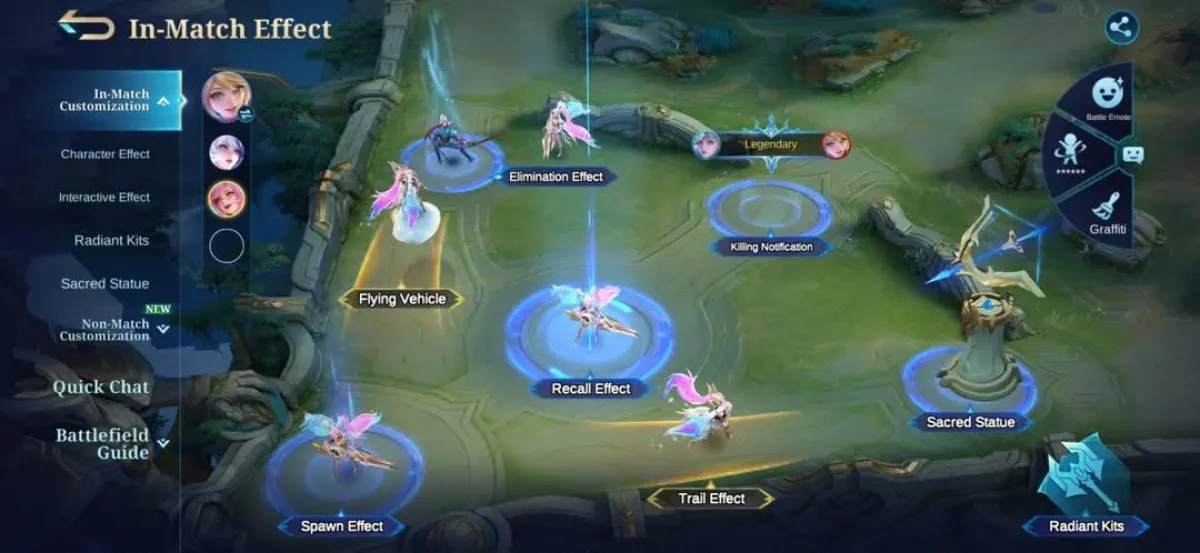
The updated Preparation interface transforms the way players configure their cosmetic items and tactical settings before stepping into a match. Previously, setting up recall effects, spawn animations, and battle emotes required navigating through multiple sub-menus with static icon previews. With the brand-new interactive layout, Moonton presents a full 3D overview of the Land of Dawn map, highlighting exact locations where each effect will trigger during gameplay.
This visual map interface allows players to see how their custom items coordinate with one another. You can test your recall animation right at the center lane, view your spawn effect at the home fountain, inspect your trail effect along the lane paths, and preview your Sacred Statue atop defensive turrets—all on a single screen.
Detailed Breakdown of In-Match Effects
The new Preparation UI categorizes customization into distinct sections, making it easier than ever to outfit your favorite heroes. Here is a close look at the main customizable effects available in the revamp:
1. Recall Effects
Recall effects remain one of the most popular ways to showcase style and flex on opponents in MLBB. Positioned right in the middle lane on the new preview map, players can instantly preview the visual light beams, animations, and sound cues of their unlocked recall effects before equipping them globally or assigning them to specific heroes.
2. Spawn Effects
Spawn effects trigger whenever your hero appears at the main base fountain—at the start of the match or after respawning. The interactive UI lets you view the exact aura and ground visual effects that surround your hero upon entering the map.
3. Trail Effects
Trail effects add dynamic glowing lines, light trails, or particle effects behind your hero as they move across the lanes. On the new Preparation interface, the path of movement is clearly marked so you can watch your trail effect in action.
4. Elimination Effects
When you knock down an enemy hero, your equipped Elimination Effect displays a dramatic knockout icon or stylized effect over the defeated opponent's position. The updated menu displays this effect right near the jungle lane area for instant visual feedback.
5. Flying Vehicles
One of the newest features integrated into MLBB's customization suite is the Flying Vehicle system. These special mount effects give heroes unique, high-flying intro animations or movement transitions. The new interface features a dedicated preview spot for Flying Vehicles, allowing players to view these extravagant models in full resolution.
6. Sacred Statues
Sacred Statues replace standard outer turrets with customized hero statues that grant bonus star protection points and unique visual flair. The interactive map highlights the turret location where your chosen statue will stand guard.
7. Killing Notifications
Customize the top banner broadcast that appears across the screen when you secure kills or multi-kills. From special event banners to Legend-tier banners, players can select their favorite style to announce their dominance.
8. Radiant Kits, Character Effects, & Interactive Effects
Rounding out the in-match customization tab are Radiant Kits, Character Effects, and Interactive Effects. Radiant Kits grant unique visual light halos and ambient hero glows, while Interactive Effects allow dynamic actions when interacting with teammates or map elements.
Non-Match Customization: Quick Chat, Emotes, & Graffiti
The Preparation overhaul is not limited to visual battlefield cosmetics; tactical and social features have also been streamlined under the Non-Match Customization sub-menu:
- Quick Chat: Customize your tactical voice and text commands. Easily drag and drop essential callouts like 'Initiate Retreat', 'Enemy Missing', or 'Gather for Turtle' into your active wheel for effortless communication.
- Battle Emotes: Set up your emote wheel with up to 6 quick-access emotes to communicate playfully with allies or taunt enemies during laning phases.
- Graffiti: Equip spray-paint graffiti designs to leave your mark on the battlefield terrain during matches.
- Battlefield Guide: Access quick tactical guides, hero role hints, and objective tips directly within the menu interface.
How to Customize Your Loadout in the New Interface
- Launch Mobile Legends: Bang Bang and navigate to the Prep tab located at the bottom left of the main home lobby.
- Select In-Match Customization from the left sidebar to open the visual map layout.
- Tap on any effect node on the interactive map (e.g., Recall Effect, Spawn Effect, Trail Effect, or Flying Vehicle).
- Browse your owned effects list on the right panel and tap Equip.
- Choose whether to apply the effect to All Heroes or set custom presets for individual heroes.
Unlock Epic Recalls and Battlefield Effects with Synn MLBB Store
Want to turn heads on the battlefield with rare recall effects, limited-edition collector skins, and exclusive Flying Vehicles? You will need MLBB Diamonds to participate in lucky draws, grand collection events, and magic wheel spins!
For fast, reliable, and affordable MLBB Diamond top-ups, head straight to SynnMLBB Store. At Synn Store, you get instant delivery directly to your account using your User ID and Server ID, with zero hassle and the best competitive rates available online. Don't let your battlefield style lag behind—power up your account today at synnmlbb.com and equip the ultimate in-match customization setup!
Conclusion
The new MLBB Interface Preparation Update is a fantastic quality-of-life upgrade for Mobile Legends players. By replacing static menus with a vibrant interactive map preview, Moonton makes customizing recall effects, trail animations, and flying vehicles more engaging than ever. Explore the new UI today, craft your perfect visual setup, and top up your diamonds at Synn Store to dominate the Land of Dawn in style!