Optimizing Mobile Legends Graphics for Maximum FPS
Learn the best graphic settings for smoother gameplay, whether you’re on a low-end phone or a high-end flagship device.
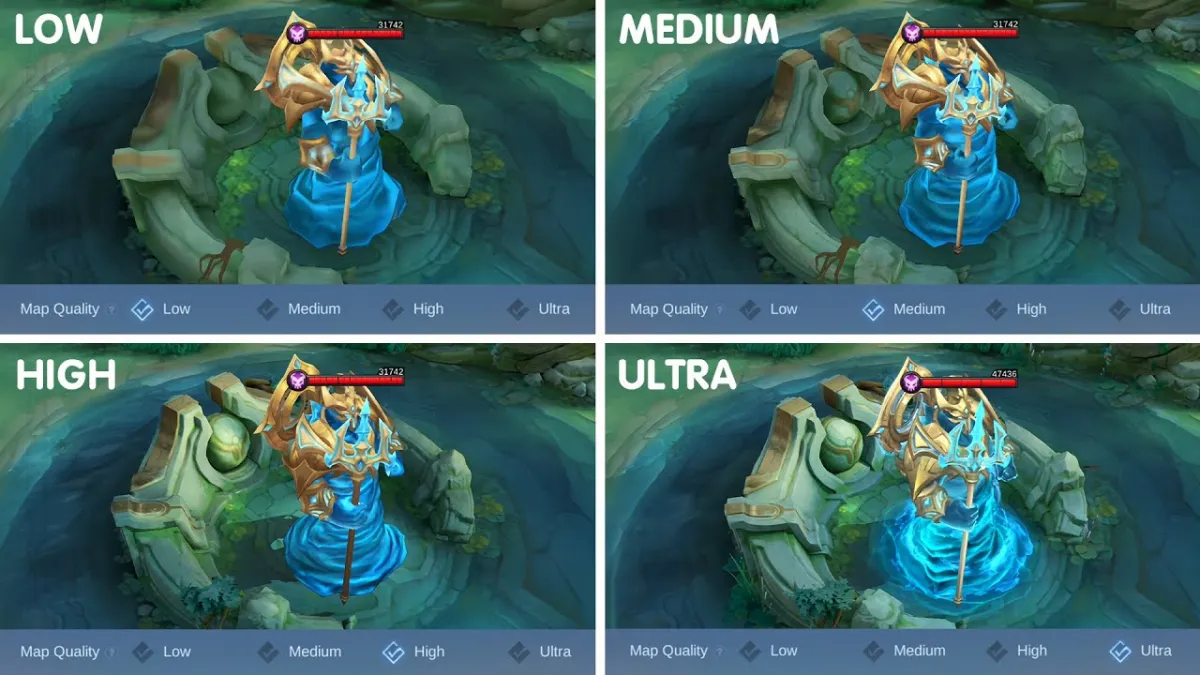
For professional Mobile Legends players, every frame and every millisecond matters. Optimizing your graphics settings is not just about smoother visuals — it’s about reaction speed, map awareness, and mechanical precision. Here’s a detailed breakdown tailored for competitive play.
Preset Selection
Smooth Mode – Use on low-end devices or during long scrims to minimize overheating and lag.
HD Mode – Recommended for flagship devices with strong GPUs; balances clarity and performance.
Custom Mode – Best for pros; allows fine-tuning each setting for maximum efficiency.
Refresh Rate / FPS
High / Maximum FPS – Essential for competitive matches; smoother animations improve skillshot accuracy.
Adaptive FPS – Drop to Low only if your device struggles during 5v5 team fights.
Camera Height
High Camera – Mandatory for pro play; expands battlefield visibility, improves gank detection, and enhances positioning awareness.
Settings to Turn Off (Performance Boost)
HD Mode Off – Unless on a flagship device, disable to reduce GPU load.
Shadows Off – Shadows add no competitive value.
Outline Off – Removes unnecessary visual clutter.
Screen Shake Off – Prevents distraction during clutch plays.
Settings to Turn On (Information Advantage)
Creep HP On – Crucial for junglers; helps time Retribution perfectly.
Damage Text On – Provides real-time feedback on DPS and burst damage.
Skill Aim Panning On – Improves precision for skillshot heroes like Franco, Selena, and Kagura.
Pro-Level Tips
Battery Management – Lower brightness and disable background apps during tournaments.
Thermal Control – Use cooling fans or play in air-conditioned environments to prevent FPS drops.
Practice Mode Testing – Test settings in Training Camp before ranked or scrims.
Device Optimization – Clear cache and close apps before matches to maximize performance.
Conclusion
For professional MLBB players, graphics optimization is part of the competitive toolkit. Smooth FPS, high camera height, and clear information overlays can be the difference between landing a clutch skillshot or missing it.
👉 Recharge Diamonds at Synn Store to unlock skins for your favorite heroes and pair them with optimized settings for peak performance.